
Native iOS · Mobile administration · Private operational application
CodeKits Admin for iOS
Working private app · Owner-supplied iPhone captures
A native iPhone workspace for running CodeKits on the move: server health, activity logs, email, business records and authenticated remote tools, connected to the website’s private APIs.
- SwiftUI
- URLSession
- Keychain
- Next.js APIs
- MySQL
- SwiftTerm
The project
I built CodeKits Admin to bring the day-to-day operation of my website into a native SwiftUI app. Overview, Logs, Email, Workspace and Tools organise work around a small screen, using direct authenticated APIs rather than embedding the website’s dashboard.
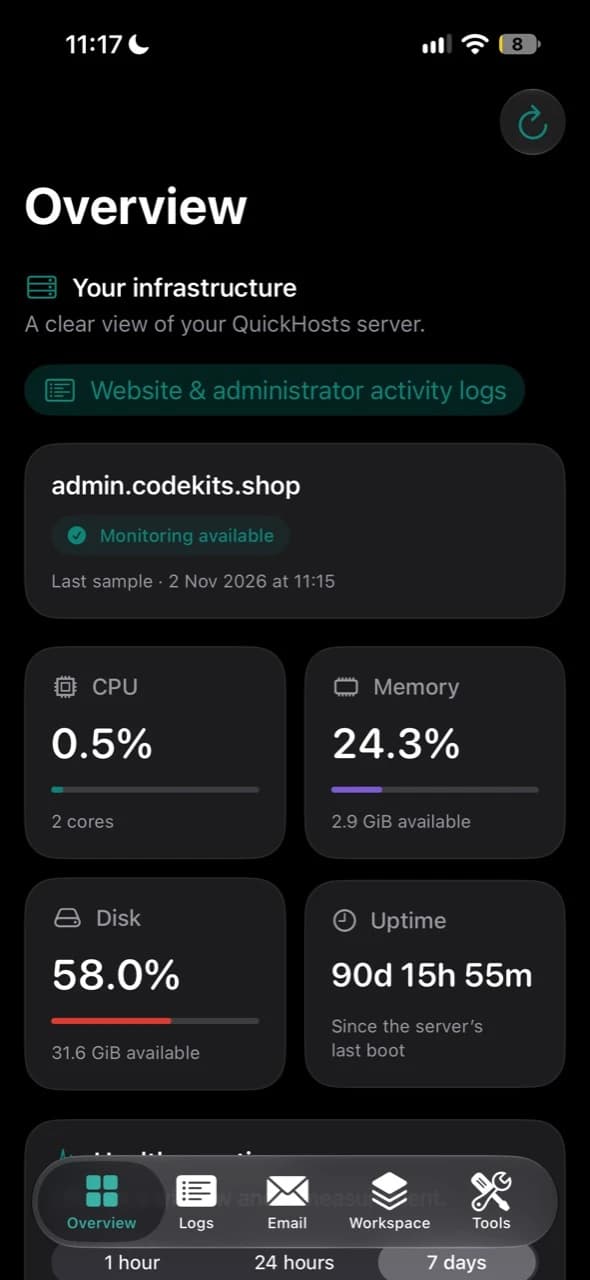
The overview shows sampled CPU, memory, disk, uptime and network measurements, history charts, service status and certificate expiry. Activity logs bring website and administrator events into a searchable, filtered review feed. Signals help prioritise investigation; they do not establish that an address is malicious.
The email workspace includes inbox navigation, search, read/archive/spam actions, composition, replies and forwarding, attachments, templates and sent or pending history. Business record screens bring enquiries, project details, orders, downloads and subscriber consent together. Those lists currently support inspection rather than every website edit or payment operation.
Private APIs use revocable, expiring sessions, with device Keychain storage and local Face ID, Touch ID or passcode unlock after backgrounding. Remote terminal and desktop tools require explicit connection and disconnect when leaving their screen or the foreground. These captures show my private operational app, rather than a public App Store download.
Work represented
- Native SwiftUI navigation across five work areas
- Server health samples, charts, services and TLS expiry
- Activity logs with review signals and server-side filters
- Native mailbox, composer, templates, attachments and sent history
- Read-only enquiries, projects, orders, downloads and consent records
- Authenticated SSH terminal and Mac desktop tools
- Keychain session storage, local unlock and server revocation
Your business operations, on mobile
I can build a similar portal for your customers or staff, scoped around the operations they need to complete. It can connect to your existing backend or a new API, with a web administration workspace where useful.
- Customers could review project progress, approve quotes or designs, submit requests and exchange documents.
- Staff could assign enquiries, update job or order status, manage appointments and respond to support requests.
- Managers could review exceptions, approve actions and see information relevant to their role.
These are possible customer workflows, not features already implemented in CodeKits Admin. A customer-facing version would enforce roles and customer boundaries on the server, validate each action, record an audit trail and confirm sensitive operations. Mobile screens would show clear success, failure and offline states, with notifications where needed. Delivery would include testing against your workflows and the appropriate iOS distribution route.
Discuss your mobile portalApplication screenshots
Explore the iPhone interface
Real application screens. Select a screenshot to enlarge it.
Infrastructure overview
CPU, memory, disk and uptime, with the timestamp of the latest server sample.
Health over time
Usage, traffic and load history, alongside service attention signals.
Services and capacity
Application process status, TLS certificate expiry, server capacity and system load.
Business workspace
Enquiries, projects, templates, orders, downloads, subscribers and app dashboards.
Email and mailboxes
Unread mail, security review and attachments. Email addresses and message previews are redacted for publication.
Activity review
Review signals, filters and grouped connections. Visitor addresses are redacted for publication.
Remote tools
Server status, SSH and Mac desktop access. The connection fingerprint is redacted for publication.